VS Code Extensions
vkhey! builds and maintains these Visual Studio Code extensions. Both make Markdown, math and diagrams readable where you work: in your code comments and in your .md files.

rEcomment
Rich Markdown and LaTeX documentation in code comments
rEcomment renders Markdown inside your code comments, so you can see docs, math and diagrams right next to the code they describe. It works with Python, JavaScript, TypeScript, Rust, Go, C++, Java, Ruby, PHP and any other language with comments.
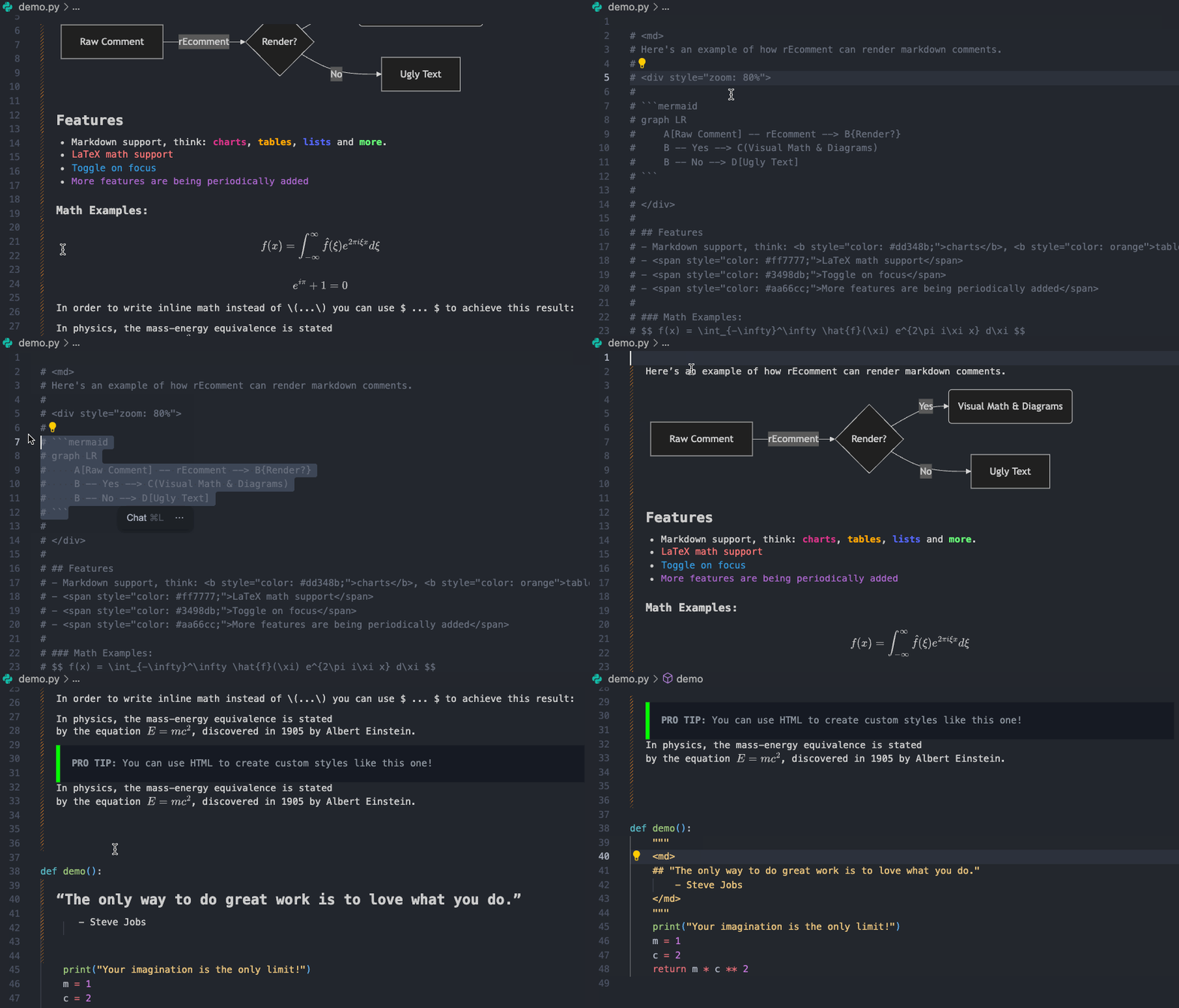
Full Markdown
Headers, lists, tables, bold/italic and code blocks inside your .ts, .py or .go comments.
LaTeX via KaTeX
Fast, high-fidelity math rendering for physics engines, financial models and research code.
Mermaid diagrams
Flowcharts, sequence diagrams and Gantt charts rendered right in source comments.
Aligned to your editor
An SVG-slicing engine keeps rendered formulas and tables in line with the editor's line height.
Click to edit
Comments render automatically; click to edit the raw text, move away to see it rendered again.
MCP server for AI agents
Lets agents in Cursor, Antigravity and Copilot read your rendered docs and diagrams.
Install it from the Marketplace, or open Quick Open (Ctrl/Cmd+P) in VS Code and run:
ext install vkhey.recomment-pro
Wrap Markdown in <md> tags inside any comment. The block renders when the cursor leaves it.
# <md>
# ## Gradient descent
# $$ \theta_j := \theta_j - \alpha \frac{\partial}{\partial \theta_j} J(\theta) $$
# </md>
def gradient_descent(...):
    ...
Jupyter-style cells also work: everything after # %% [markdown] renders until the first line of code.
To connect AI agents, open the rEcomment tab in the sidebar and click Boost AI (Init MCP). In Cursor, restart, then enable rEcomment under Settings > Tools > MCP.
Settings: recomment.enabled, recomment.autoExpand, recomment.compactMode, recomment.escapeSpecialCharacters.
rEcomment sends only aggregated usage metrics. It never collects code, file paths, variable names or other content from your workspace. It respects VS Code's global telemetry setting: turn telemetry off in Settings > Telemetry and rEcomment sends nothing.

rEmarkd
Minimalist multi-tab Markdown preview
rEmarkd replaces VS Code's default Markdown preview. Every .md file opens as its own rendered tab, so you can keep several previews open side by side, with GitHub-style tables, Mermaid diagrams and LaTeX math.
Rendered by default
Opening a .md file shows the rendered view. Use Edit Markdown Source to see the raw text.
One tab per file
Unlike the built-in preview, every file gets its own rendered tab. Keep as many open as you want.
Split editor support
Split a rendered tab for two live previews of one file, each with its own scroll position.
Theme aware
Follows your light, dark or high-contrast VS Code theme, with matching code highlighting.
Mermaid and KaTeX
```mermaid blocks render as diagrams; $inline$ and $$block$$ math render with KaTeX.
Zero clutter
No accounts, no extra panels. Just Markdown, rendered well.
Install it from the Marketplace, or open Quick Open (Ctrl/Cmd+P) in VS Code and run:
ext install vkhey.remarkd
Open any .md file. It renders automatically. To edit the source, click Edit Markdown Source in the editor toolbar, or right-click the tab and choose Reopen Editor With > Text Editor.
For two previews of one file, run Split Editor from the Command Palette (Ctrl/Cmd+Shift+P).
Setting: remarkd.theme (auto, light or dark; default auto).
Feedback and support
Found a bug or want a feature? Use the Send Feedback command in rEcomment, leave a review on the Marketplace, or get in touch.
Contact →